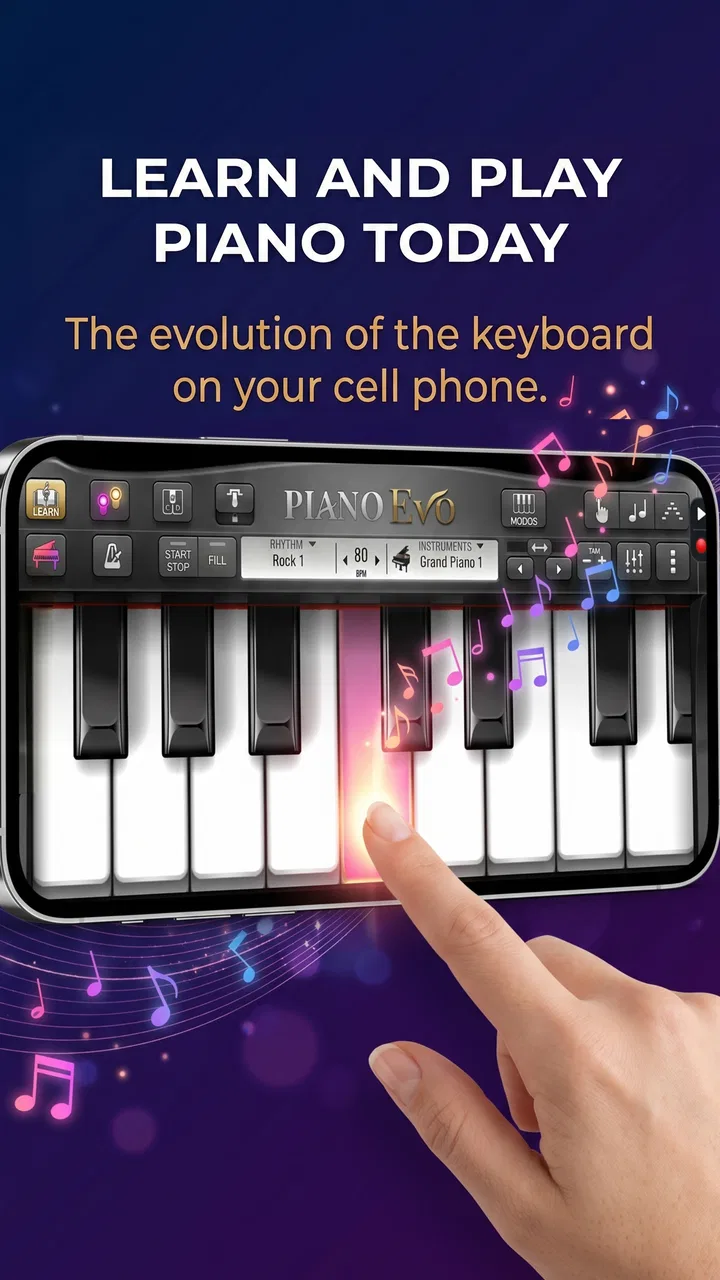
Piano Evo: Learn Songs & Music
- 4.7
- Rating
- 100.00K
- Installs
- Free
- Price

 Analysis by App-foxy
I spent time with Piano Evo: Learn Songs & Music as a music game, and my first impression was that it aims for a useful middle ground: more purposeful than a simple piano-tapping toy, but less demanding than a full course built around a physical instrument and a teacher. Its focus is learning songs, chords, scales, and keyboard technique in a format that feels approachable on a phone or tablet.
That distinction matters. I would not treat it as a replacement for regular piano lessons, and I would not expect a touchscreen to reproduce the feel of weighted keys. However, I can see why someone who wants a low-pressure way to practice musical ideas would give it a try. The free entry point makes experimentation easy, while the optional purchases mean that anyone planning to use it seriously should think about how much of the experience is available without paying.
How Piano Evo fits into everyday music practice
The game comes from GMobiler Apps and sits in the music category rather than trying to be a general entertainment title. That gives its design a clearer purpose: you are not simply chasing points by tapping random notes. The useful question is whether the keyboard, lessons, chords, scales, and MIDI-oriented approach help you turn short sessions into practical musical understanding.
You May Also Like

 AccuWeather: Weather Radar
AccuWeather Review: A Quick, Clear Forecast for Everyday Decisions
For everyday plans, the best forecast is the one you can understand quickly. AccuWeather makes rain timing, radar, and local conditions easy to act on, with a few trade-offs.

 Hill Climb Racing
Why Hill Climb Racing Still Turns Crashes Into One More Run
A tiny car, a bumpy hill and one more upgrade: Hill Climb Racing keeps resurfacing because its simple chaos makes every near-miss feel personal.

 AliExpress - Shopping App
AliExpress Makes Global Shopping Feel Personal, but Shoppers Bear the Risk
AliExpress turns a global marketplace into a pocket-sized discovery engine. Its reach is useful, its shopping loop compelling, and its trade-offs easy to miss.

 Lords Mobile: Kingdom Wars
Lords Mobile Is a Kingdom-Building Routine, Not a Quick Match
A case-by-case verdict on the building, battles, device demands, and social commitments that make Lords Mobile rewarding for some players and exhausting for others.

 PDF Scanner app - TapScanner
TapScanner Makes Paperwork Easier to Capture, Check, and Share
TapScanner makes scanning with a phone feel less like a rescue operation and more like a dependable step in getting work done. Its capture tools are useful, though not flawless.

 Block Blast!
Block Blast! Shows How Much a Puzzle Game Can Leave Out
A quiet grid game shows why puzzle players increasingly value instant clarity, repeatable skill and low-pressure play—and where the genre still needs to catch up.
More From Our News Desk
View All News


I found the keyboard concept most appealing for beginners who are still learning where notes sit. A virtual layout gives you an immediate visual reference, which can be less intimidating than opening a traditional theory book. If you have ever looked at a chord diagram and wondered how the notes relate to one another, playing those notes directly can make the idea easier to remember.
The game format also changes the emotional pressure. A learner can repeat a passage privately, make mistakes, and start again without feeling watched. That is valuable for someone who has postponed piano because formal lessons feel too serious. It is also handy for a player who already knows basic notes but wants a quick refresher during a spare moment.
Still, I would keep expectations realistic. A virtual keyboard can teach patterns, note names, and coordination, but it cannot fully teach posture, finger weight, pedal control, or the physical response of an acoustic or digital piano. Those are not minor details if your goal is to become a confident pianist rather than simply recognize melodies.
What the free starting point really means
The game is free to install, which is a meaningful advantage when deciding whether its teaching style suits you. You can approach it without committing money at the beginning, explore the interface, and decide whether the touch controls feel comfortable. That is a better arrangement than paying before discovering that a phone screen is too cramped for your hands.
There are also in-app purchases priced from $7.99 to $14.99 per item. I would interpret that as a reason to test the free experience carefully rather than assuming every lesson or learning path is included. The app can be free to start while still having paid material that affects its long-term value. For a casual learner, the free portion may be enough to decide whether daily practice becomes a habit. For someone looking for a complete structured course, the purchase options deserve attention before treating the app as a full solution.
In practical terms, I would use the no-cost access as an audition. Spend several short sessions checking whether the note feedback is understandable, whether the lessons match your level, and whether the keyboard responds naturally under your fingers. If those basics work for you, paid content may feel more worthwhile. If they do not, spending more will not fix the central problem.
Lessons, songs, chords, and scales in one place
The combination of lessons and song practice is the strongest part of the concept. Lessons can give a beginner direction, while songs provide a reason to keep applying what was introduced. Chords and scales add another layer: instead of learning only isolated melodies, you can start noticing the building blocks behind them.
One useful workflow is to separate recognition from performance. I would first use the keyboard slowly to locate the notes, then review the relevant scale or chord shape, and only afterward attempt the song passage at a more comfortable pace. This prevents the common beginner mistake of repeating a wrong hand position simply because the melody sounds familiar.
Another worthwhile habit is to treat scales as a warm-up rather than a chore. A brief scale exercise can help you orient your fingers before a song session, especially when you have not played for several days. The game format may make that repetition feel less dry than reading a list of scales, although it still cannot replace the tactile feedback of real keys.
Chords are particularly useful for people interested in songwriting or accompaniment. Even if you do not become fluent immediately, seeing how several notes work together can shift your attention from pressing individual keys to understanding harmony. That is a more transferable skill than memorizing one tune, provided you continue practicing outside the app as well.
Why MIDI matters, and where it changes the decision
The MIDI mention makes the app more interesting for users who own compatible keyboard equipment. A touchscreen is convenient, but a physical keyboard offers spacing, resistance, and a more natural hand position. If the app works with the MIDI setup you already use, it could serve as a practice companion rather than a substitute instrument.
I would not buy hardware solely on the assumption that the app will transform it into a complete teaching system. The sensible order is the reverse: if you already have a compatible MIDI keyboard, test whether the connection and lesson workflow fit your routine. This is one of the app’s clearest potential advantages for an existing player, but it is also the area where compatibility details matter most to the individual setup.
A realistic evening routine might look like this: after dinner, I would spend a few minutes reviewing a scale, move to a chord exercise, and then work on one song section with the MIDI keyboard connected. The point would not be to finish an entire song every night. It would be to leave with one small passage more familiar than it was before. Short, repeatable sessions are more useful than an ambitious plan that becomes difficult to maintain.
The tradeoff between convenience and musical realism
Phone-based practice wins on convenience. You can carry it around, start quickly, and use a quiet moment without setting up a full instrument. That makes it suitable for travel, breaks, or a learner who shares a home and cannot always play aloud. The screen can also make note locations and lesson instructions visible in a way that a physical keyboard alone cannot.
The compromise is physical realism. Touchscreen keys do not behave like piano keys, and even a MIDI keyboard may not reproduce every part of a guided lesson experience in the same way. If your main goal is finger strength, expressive dynamics, or developing a reliable sense of touch, a real instrument should remain central.
I also think screen size will affect enjoyment. A tablet is likely to feel more comfortable than a small phone when several keys or instructions need to be visible at once. On a compact display, beginners may spend more attention finding the right area to tap than listening to timing and tone. That does not make the app unusable, but it changes how patiently you may need to work.
Who will get the most from it
I would recommend trying it first if you are a complete beginner, a returning player, or someone who wants a guided musical activity without immediately enrolling in lessons. The Everyone age rating also makes it approachable for a broad household audience, although younger learners will still benefit from an adult helping them turn game time into consistent practice.
It may also suit a hobbyist who understands basic notes but feels uncertain about chords and scales. The app’s value is not limited to learning melodies; its broader set of musical topics can help connect theory with playing. That makes it more useful than a pure rhythm game for someone who wants skills that carry over to a keyboard.
For a parent, the free starting point lowers the risk of testing it with a child. I would set a small goal, such as identifying a few notes or completing one focused exercise, rather than presenting it as unlimited screen entertainment. That approach keeps the game element supportive instead of allowing tapping speed to become the only measure of progress.
Existing piano players may find it useful as a lightweight review tool. It can fill a gap when a full instrument is unavailable, or provide a structured prompt when motivation is low. However, advanced players seeking detailed interpretation, repertoire depth, or teacher-level correction will probably outgrow it. A dedicated lesson platform, method book, or instructor would be a better choice for those needs.
Who should probably skip it
I would skip this game if you already know that you need a physical piano to stay engaged. The convenience of a virtual keyboard is its main attraction, so it cannot overcome a strong preference for real key action. I would also look elsewhere if your priority is formal examination preparation or a carefully sequenced curriculum with personal feedback.
It is not the best fit for someone who wants a pure arcade experience either. The lessons, chords, scales, and MIDI angle suggest a learning-focused product, so players looking only for fast reflex challenges may find the educational structure less exciting than a conventional rhythm game.
There is another practical tradeoff for budget-conscious users. Because paid items range between $7.99 and $14.99, the long-term cost depends on what you want to access and how deeply you intend to use it. I would not assume that installing it for free equals receiving every learning resource. Try the available material, identify the exact gap you want to fill, and only then decide whether a purchase offers enough value.
Performance expectations and device choice
The minimum operating-system requirement is Android 7.0, so the app is aimed at a wide range of Android devices rather than only recent phones. That is helpful for people using an older compatible handset, but musical timing still depends on the individual device and setup. If taps feel delayed or the screen is difficult to read, a newer phone, tablet, or MIDI keyboard may provide a more comfortable experience.
I would test the app in the place where you actually plan to practice. A quiet room with headphones may make short sessions easier to concentrate on, while a tablet on a stand can reduce the need to hold the device. If you are using MIDI, arrange the keyboard and screen before starting so the lesson does not become a sequence of interruptions.
The current release is version 1.0.2, which tells me I would approach it as a relatively early product rather than a mature replacement for long-established piano education tools. That is not automatically negative. Early versions can still be enjoyable and useful, but I would judge it by how clearly the current lessons work for me instead of assuming it has every refinement found in older specialist platforms.
How it compares with the usual alternatives
Compared with a traditional teacher, this game is cheaper to try, more private, and easier to fit around an irregular schedule. A teacher remains far better at spotting tension, correcting posture, adjusting technique, and choosing exercises for a specific learner. If you keep making the same physical mistake, an app may not explain the cause as effectively as a person watching your hands.
Compared with a method book, the app offers a more active experience. You can interact with the keyboard instead of only reading notation or diagrams, and the game structure may help maintain attention. The book has the advantage of being predictable, portable, and easy to annotate, while the app is more immediately engaging for learners who struggle to study from pages alone.
Compared with a standard rhythm game, Piano Evo appears more useful for building musical vocabulary. Chords and scales give the activity a foundation beyond timing and reaction. The rhythm-game alternative may be more exciting for pure entertainment, but it is less likely to help someone understand why notes fit together.
Compared with a full online piano course, this app’s appeal is its lighter commitment. A comprehensive course may provide richer progression, demonstrations, practice plans, and broader feedback, but it can also feel overwhelming or costly. I would choose this game when I want to begin gently, and move to a more complete course when I need accountability or deeper technique.
What I would do before paying
I would begin with a clear test rather than browsing aimlessly. First, I would see whether the keyboard layout is comfortable on my device. Next, I would complete enough of a lesson to decide whether the instructions are genuinely understandable. Then I would try a chord or scale and check whether the activity helps me remember it afterward without looking at the screen.
After that, I would attempt a short song passage on a second day. This matters because an app can feel impressive during a first session but fail to create a repeatable routine. If I still wanted to return after several brief practices, I would compare the paid item’s cost with the specific amount of additional learning it provides.
I would also keep a small notebook or phone note beside the device. Writing down the names of a few chords, the notes in a scale, or the section that caused trouble turns passive tapping into active recall. This is an easy way to increase the educational value without pretending that the app alone can supply every part of piano training.
My verdict on its value
With an average rating of 4.7 from around 649 ratings and more than 100,000 installs, the game has attracted meaningful interest from Android users. Those figures make it worth investigating, but they do not remove the need to judge whether its touch controls and learning flow suit you personally. Music apps are especially dependent on device comfort and individual goals.
For me, the strongest case is the beginner who wants an inexpensive, low-pressure introduction to notes, songs, chords, and scales. The free installation makes that first experiment straightforward, and the MIDI focus gives it extra potential for people who already own a compatible keyboard. The age rating of Everyone also makes it flexible for family use when practice is kept purposeful.
The weaker case is the serious pianist expecting a complete substitute for an instrument, teacher, or advanced course. The paid items mean that deeper use may require more spending, and the virtual keyboard cannot reproduce every physical skill. Those are important limitations, not reasons to dismiss the game outright.
My recommendation is to try the free access first, use it for several focused sessions, and pay only when a specific lesson path proves useful. I would choose it as a friendly practice companion and an entry point into piano concepts, not as the final destination for serious musical development. For that audience, its balance of convenience and structured learning makes sense; for everyone else, the usual alternatives may provide better value.
In short, Piano Evo is most convincing when it helps you start playing instead of merely planning to learn. If a short daily session on a screen can lead you toward a real keyboard, better note recognition, or a clearer understanding of chords, it has done something worthwhile. Just keep the purchase decision tied to the content you will actually use, and let your musical goal—not the game label alone—determine whether it belongs in your routine.
FAQs for Piano Evo: Learn Songs & Music
01What is Piano Evo: Learn Songs & Music, and who is it designed for?
Piano Evo: Learn Songs & Music is an interactive piano-learning app designed for beginners, casual players, and users who want to practice popular songs at their own pace. It generally combines guided lessons, song-based exercises, visual notes, and rhythm practice. It can be useful for people starting from zero, although users with previous piano experience may find the introductory material too simple.
02Can I use Piano Evo without owning a physical piano or keyboard?
The app is intended to work with an on-screen piano, so you can begin practicing even if you do not own a real instrument. This makes it convenient for learning note positions, melodies, and basic timing with a phone or tablet. However, touchscreen practice does not completely replace playing weighted keys, so serious learners may eventually benefit from connecting or using a separate keyboard.
03Does Piano Evo include songs, lessons, and exercises for different skill levels?
Piano Evo: Learn Songs & Music typically focuses on learning through songs rather than offering only traditional theory lessons. Its content may include simple melodies, guided note sequences, rhythm challenges, and progressively more demanding pieces. Beginners should find the early exercises approachable, while advanced players may use the app mainly for casual practice or learning selected melodies instead of comprehensive music training.
04Is Piano Evo: Learn Songs & Music free to download and use?
The application may be available as a free download, but some lessons, songs, features, or practice options can be restricted behind in-app purchases or a subscription. Before starting a trial, check the pricing page carefully, including renewal terms and cancellation instructions. Availability of premium content and payment options can also vary depending on your Android or iOS region.
05Does Piano Evo require an internet connection, and is it suitable for children?
An internet connection may be needed for downloading the app, loading song content, synchronizing progress, displaying advertisements, or accessing premium features. Some previously downloaded material might work offline, although this can vary by version. The colorful, game-like approach may appeal to children, but parents should review purchases, advertisements, privacy permissions, and any account requirements before allowing unsupervised use.
Pros
- Interactive lessons make learning piano feel engaging and approachable.
- Song-based practice helps connect theory with recognizable music.
- Suitable for beginners with little or no previous piano experience.
- Short practice sessions fit easily into a busy daily routine.
- Works well for exploring basic notes
- chords
- and rhythm skills.
Cons
- Advanced players may find the lesson content too limited.
- Some songs or features may require in-app purchases or subscriptions.
- Virtual keyboard practice cannot fully replace a real piano.
- Progress may feel repetitive without regular practice and patience.
- Performance can depend on your device’s screen size and responsiveness.

Piano Evo: Learn Songs & Music
Gallery